


“How much should we spend on ads?” is one of the first questions every business owner in the UAE asks, and it is usually answered with a guess. A round number gets picked, the campaign runs for a month, and nobody is quite sure whether the budget was too high, too low or about right.
There is a better way. Every ad budget comes down to a few numbers you can estimate before you spend a single dirham. This guide walks you through the formula, shows you how to use our free ad budget calculator and explains how to compare Google, Meta, TikTok, Snapchat, LinkedIn and YouTube side by side.
The short answer
Start with the number of leads you want each month. Divide it by your expected conversion rate to find how many clicks you need, then multiply those clicks by the average cost per click. The result is your monthly ad budget. The calculator does this for you in AED, with starting values for your industry and platform.
Try the free ad budget calculator
The formula behind every ad budget
Whatever platform you use, a paid campaign works the same way. You pay for clicks (or views), a share of those people take action, and those actions become leads or sales. That gives you a simple formula:
Monthly budget = (Leads you want ÷ Conversion rate) × Cost per click
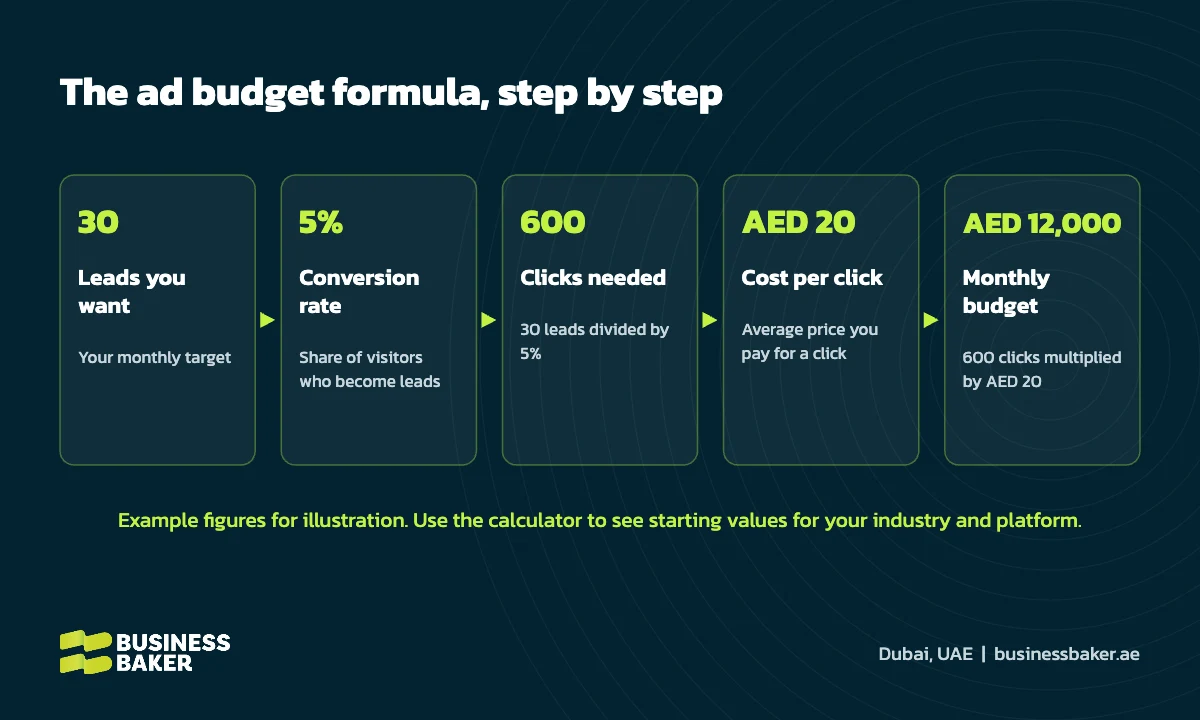
In the example above, a business that wants 30 leads a month, converts 5% of its visitors and pays an average of AED 20 per click needs 600 clicks, which works out to a monthly budget of AED 12,000 and a cost per lead of AED 400. Change any one of those numbers and the budget changes with it, which is exactly why a guessed budget so often misses.
The numbers you need to know
| Number | What it means | Where to find it |
|---|---|---|
| Leads per month | How many enquiries, calls or bookings you want | Your sales target and how many leads your team can handle |
| Cost per click (CPC) | The average price you pay each time someone clicks your ad | Your ad account, or the starting values in the calculator |
| Conversion rate | The share of visitors who fill a form, call or message you | GA4 or your ad account conversion data |
| Close rate | The share of leads that become paying customers | Your CRM or sales records |
| Average sale or order value | What a typical customer spends with you | Your sales or ecommerce data |
If you already run ads, use your own numbers. If you are starting fresh, the calculator fills in indicative starting values based on published advertising benchmarks for each platform and industry, so you have something sensible to plan with.
How to use the ad budget calculator
- Pick a platform. Choose Google Search, Meta (Facebook and Instagram), TikTok, Snapchat, LinkedIn or YouTube.
- Choose how you want to plan. Select “I know my lead target” to find the budget you need, or “I know my budget” to see what it could deliver.
- Select your industry. The calculator loads a starting cost per click and conversion rate for that industry. If yours is not listed, choose Other and type it in.
- Adjust the assumptions. Replace any starting value with your own data for a more accurate estimate.
- Read your estimate. You will see the monthly and daily budget, clicks, leads, cost per lead and new customers. Ecommerce businesses also see estimated revenue and return on ad spend.
- Compare platforms. The comparison table shows how the same budget would perform on all six platforms.
- Get it by email. Enter your details to receive your estimate as a branded PDF and, if you like, book a free consultation with our team.
Comparing platforms: cheap clicks versus high intent
The cheapest click is not always the cheapest customer. Each platform plays a different role, and the right mix depends on how your customers find and choose a business like yours.
| Platform | Best for | What to expect |
|---|---|---|
| Google Search | Services people actively search for | Higher cost per click, but high intent leads who are ready to act |
| Meta (Facebook and Instagram) | Visual offers, local services and ecommerce | Lower cost per click and strong targeting by interest and location |
| TikTok | Reaching younger audiences with short video | Low cost reach, best with native style creative |
| Snapchat | Young UAE audiences and consumer brands | Low cost clicks and strong reach in the Gulf |
| B2B services and senior decision makers | The highest cost per click, with precise targeting by job title and company | |
| YouTube | Awareness, education and retargeting | Low cost views that build demand for other channels |
For a deeper look at the two biggest platforms, read our guide to Meta Ads vs Google Ads for UAE businesses and our breakdown of Google Ads costs in Dubai.
Ecommerce: plan around revenue and ROAS
If you sell products online, leads are only part of the picture. Choose Ecommerce and retail in the calculator and enter your average order value. The calculator then estimates orders, revenue and return on ad spend (ROAS), which is revenue divided by ad spend. A ROAS of 4x, for example, means every AED 1 spent on ads brought back AED 4 in sales. Remember that ROAS measures revenue, not profit, so compare it with your margins before deciding how far to scale.
What the estimate does not include
- Agency or management fees. The calculator covers ad spend paid to the platform only.
- Creative and landing pages. Design, video production and website work are separate costs.
- VAT. All figures exclude VAT.
- Market changes. Click prices move with competition, seasons such as Ramadan and the summer slowdown, and platform auctions.
The figures are approximate planning estimates, not a quote or a guarantee. Actual results depend on the detailed scope, once it has been discussed with our team.
Five ways to get more from the same budget
- Fix your landing page first. Raising your conversion rate from 3% to 6% halves your cost per lead without spending more.
- Track every lead. Measure forms, calls and WhatsApp clicks so each platform optimizes toward real enquiries.
- Start focused. One or two platforms with enough budget to learn beat six platforms with too little.
- Test creative often. New hooks, visuals and offers keep social campaigns from going stale.
- Review weekly, decide monthly. Give campaigns enough data before moving budget, then put more behind what works.
Get a second opinion on your numbers
A calculator gives you a starting point. A conversation turns it into a plan. Our team manages campaigns across Google, Meta, TikTok, Snapchat, LinkedIn and YouTube for businesses across Dubai and the UAE. Run your numbers through the ad budget calculator, explore our paid advertising services or talk to our team about a free consultation.
Ready to put your budget to work on search? Our Google Ads management team can build and run the campaigns for you.
Frequently asked questions
How much should a small business in the UAE spend on ads?
Start with the number of leads you need each month, then work backwards using your cost per click and conversion rate. Many small businesses test with a few thousand dirhams a month on one platform, measure cost per lead for four to eight weeks, then scale what works. Our ad budget calculator gives you an approximate starting point in AED.
Is the ad budget calculator free?
Yes. The calculator is free to use and you do not need to share any details to see your estimate. If you want the estimate as a PDF, enter your details and we will email it to you straight away.
How accurate are the calculator results?
The results are approximate planning estimates, not a quote or a guarantee. Starting values come from published advertising benchmarks and general market observations, and actual results depend on the detailed scope once it has been discussed with our team. You can replace any starting value with your own data for a sharper estimate.
Does the budget include agency fees or VAT?
No. The calculator estimates advertising spend only, which is the amount paid to the ad platform. Management fees, creative production, landing pages and VAT are separate.
Which platform gives the lowest cost per lead?
It depends on your industry and offer. Social platforms usually have cheaper clicks, while Google Search often brings higher intent leads that convert into customers more often. The platform comparison table in the calculator shows how the same budget performs across all six platforms.
Can ecommerce businesses use the calculator?
Yes. Choose Ecommerce and retail as your industry and the calculator adds your average order value, then shows estimated revenue and return on ad spend alongside clicks and orders.